SnapBill for Groups
Group billing,from shift sheet to pay stub.
For emergency departments and physician groups billing OHIP under a group number. Physicians email their sheets, your clerk reviews them, one group file goes out, and every physician sees what they were paid and why.
Built by physicians who work ED shifts. SnapBill submits as your group's MCEDT designee.
How it works
A month of shifts, start to finish
- 1
Physicians email their sheets
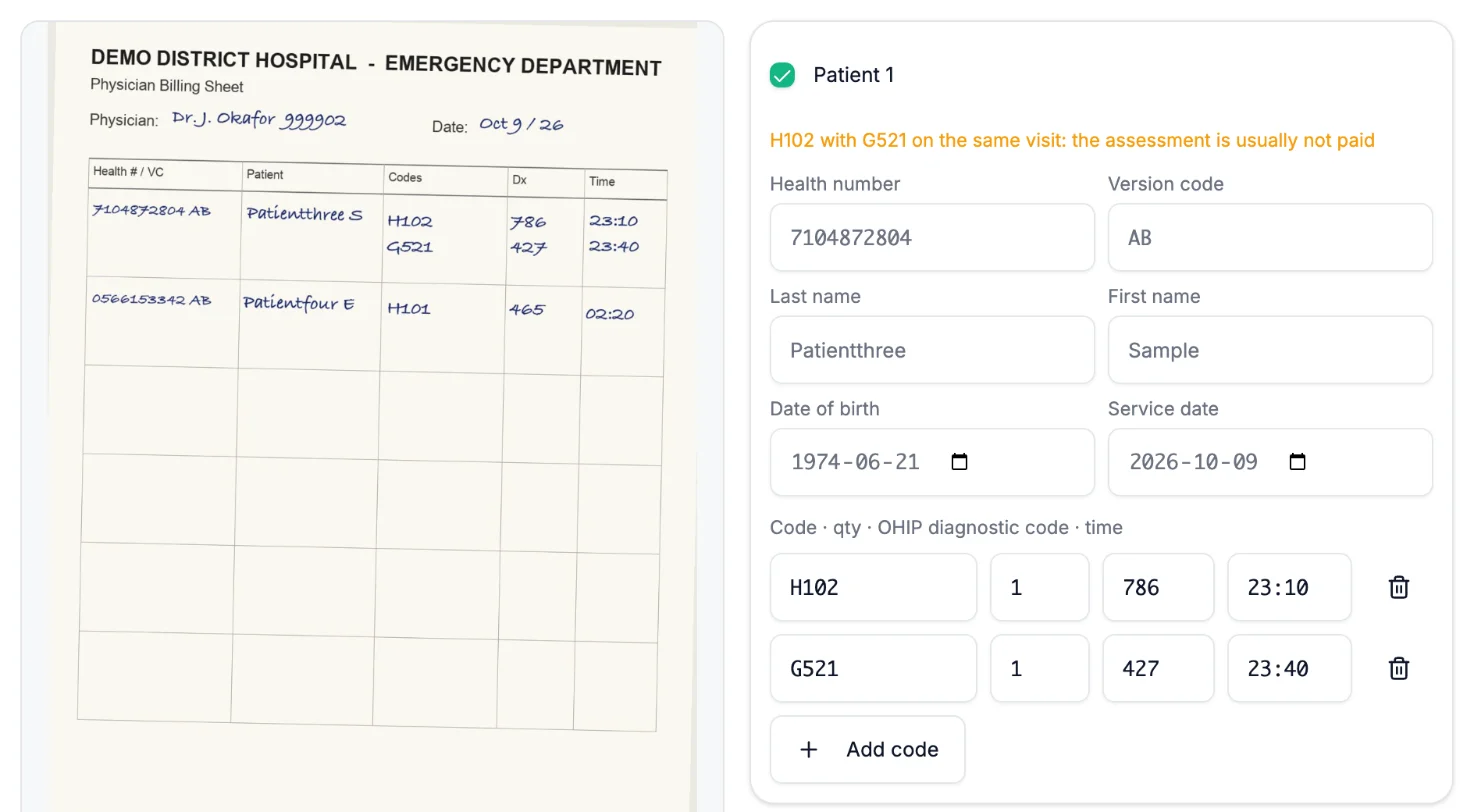
Each physician has their own address, like smith.yourhospital@claims.snapbill.ca. A photo or scan of the shift’s handwritten sheet is all it takes; PDFs with many pages are split automatically.
- 2
SnapBill reads every page
Health numbers, fee codes, diagnostic codes and visit dates are read from the sheet and checked against the Schedule of Benefits. Only mail from the physician’s own address is accepted.
- 3
Your clerk reviews, then claims are created
The billing clerk sees the page beside what was read, fixes anything misread, and creates the claims under the group. Nothing is sent without that review.
- 4
One group file, one Group RA, one pay run
Claims go out in one file under the group number, a batch per physician. The Group RA is split back to each physician, and pay stubs are released when the month is complete.
At a glance
The whole group on one screen
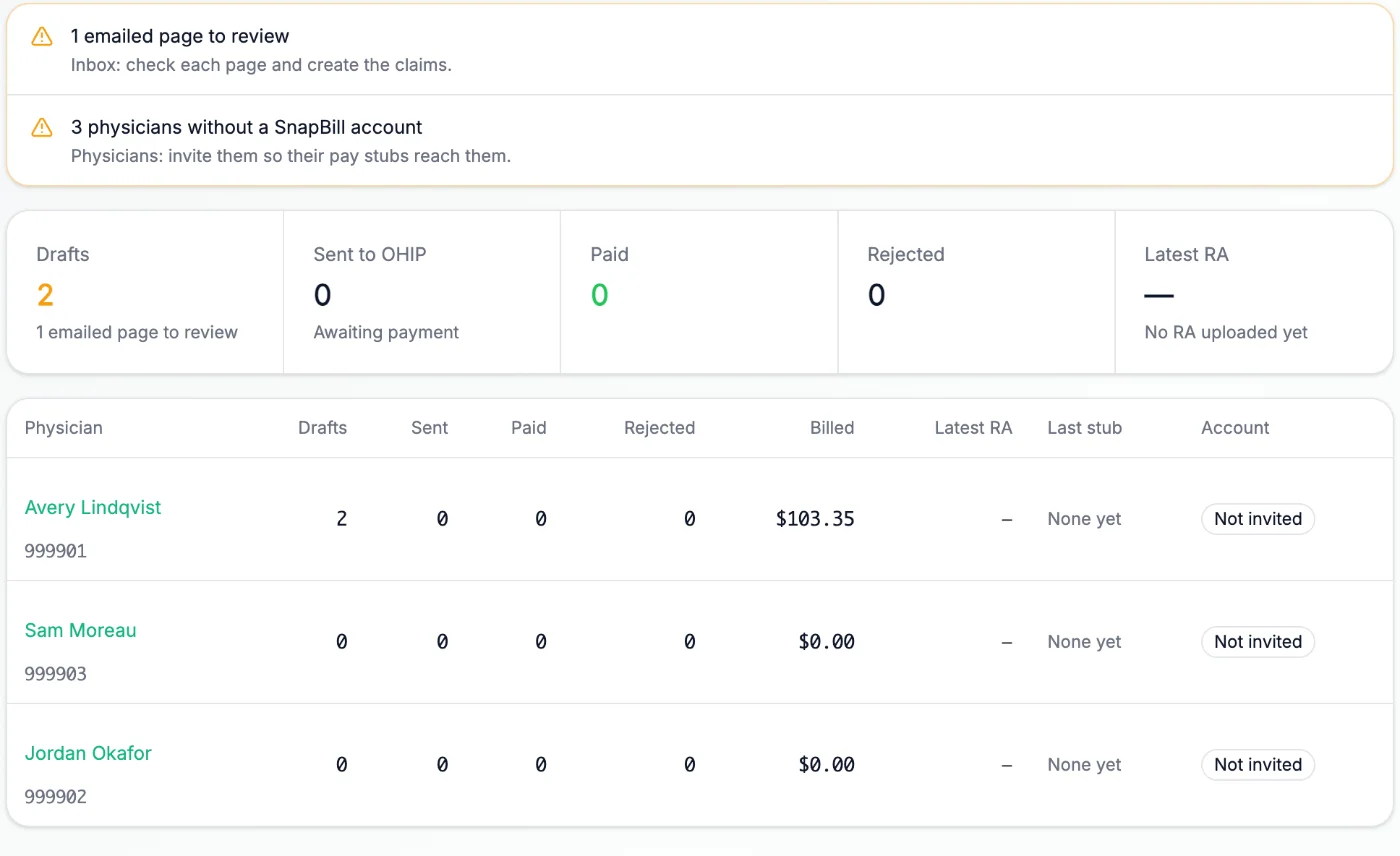
Sheets waiting for review, billing numbers on the RA that are not in the group, and where each physician stands.
For the billing office
Less typing, fewer missed visits
A lost sheet or an unbilled visit costs the group twice: the payment now, and the visit count your funding is based on.
Claim sheets by email
Handwritten ED sheets become reviewable claims without retyping a health number.
A review screen built for the clerk
Every physician’s pages in one inbox, side by side with what was read, with checks on every number before a claim is created.
Group RA split by physician
Upload the monthly Group RA and see what each physician was paid, line by line, with any billing number the group does not recognise flagged.
Pay statements, released when ready
Shadow rates and shift bands per site. Approve the run, release it, and each physician gets a PDF stub with your group’s logo.
Physicians see what got paid
Which codes paid, which did not, and why, in plain words. An assessment billed with critical care that keeps coming back unpaid is shown, not buried.
Group and solo billing kept apart
Physicians who also bill on their own, or work at several sites, see each group’s billing separately from their own, in one account.
Under every group claim
The billing engine physicians already use
Group claims run through the same checks, submission and reconciliation as every SnapBill claim. More visits get paid, and the ones that are not get fixed.
Every claim checked before OHIP sees it
Each claim is checked against the Schedule of Benefits for code pairs that will not pay together, missing premiums and time-of-day rules, and diagnostic and master numbers.
Submitted through MCEDT, tracked to paid
SnapBill is registered with the Ministry and submits through MCEDT as your designee. Every claim is followed from upload to batch edit to remittance.
Rejections explained and fixed
Error report codes are explained in plain words, a correction is proposed, and the claim is resubmitted. Rejections stop piling up in a folder.
Every RA line matched to its claim
Remittance advice is read line by line and matched back to each claim, so underpayments, reductions and claims that were never paid stand out.
Snap a whole list, look up any code
One photo of a sticker sheet, census or rounding list becomes claims, and the full Schedule of Benefits is searchable with fees and rules.
Group billing is high stakes. We start carefully.
Before SnapBill sends anything for your group, we compare a month of your own claim file and Group RA against what SnapBill would have built, claim by claim. Until then you can review and download the group file yourself. Payments never leave your group's account.
Group billing questions
Emergency departments and physician groups in Ontario that bill OHIP under a group number, such as ED alternate funding agreements, where the Ministry pays the group one monthly Group RA and the group pays its physicians.
No. Payments stay with your group and its bank account. SnapBill calculates each physician’s statement from your rates and the Group RA and sends it to them; your group pays them as it does today.
Your group representative adds SnapBill MD as a designee on the group’s MCEDT account, the same way physicians do for their own billing. Before the first submission, SnapBill compares a month of your group’s own claim file and Group RA against what it would have built.
No. Your clerk can bill for every physician from day one. Physicians you invite can create a free account to see their pay stubs and which codes were paid, and to email in their own sheets.
Group pricing depends on the size of the group and what you would like SnapBill to take on. Email hello@snapbill.ca and we will send a quote.
SnapBill is PHIPA compliant, encrypts data at rest and in transit, and keeps it on Canadian servers. Each person sees only what their role in the group allows, and every view of patient data is logged.
Bill your group the way your physicians work.
Tell us about your site: how many physicians, how sheets are handled today, and how pay is calculated.